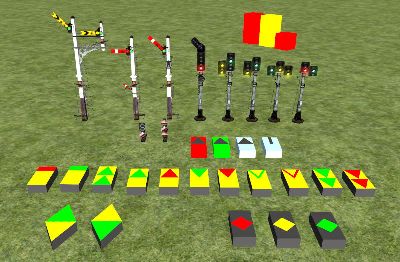
To celebrate 10 years of AndiS, I wrapped up what I have for some public beta that ought to be alpha but who know? Thanks to Pete for telling me that scenario-specific signals work now, without that info I would not have restarted my efforts. Thanks to Richard Armstrong for approaching me with kind words a year ago, without him being interested I would not have persevered enough on this. And thanks to Matt and Jim for providing wonderful places of exchange, without them there would be no AndiS at all.
Thanks to all the countless people who gave me invaluable information, about scripting and about the prototype. The present pack is just a wrap-up of what you gave. And thanks to all the people who created beautiful models, from signals to fire buckets. Without them, any script would be pretty useless.
The following is not totally new for people who read
the other tread on my work. It is just a copy of the information I published on UKTS. In short, scenario-specific movement predictors recently became a reality and I integrated all the CLS I could find.
If you find a bug, please send your log file to the address given in the manual. If you have questions about the functionality, please raise them here so everyone can benefit from the clarifications that will be elaborated.
Please do read the manuals! They are long because there is much to say.
Link to downloadStuff that already works:- Stop signals can be outer or inner home, starter or advance starter, and approach control at the home when the starter is closed (rule 39a) is implemented. Stop signals show caution if they can after clearing under rule 39.
- Distants (and distant arms at stop signals) can be outer distants for the next, second or third box, or inner distants. Inner distant arms can also be omitted (as they were at times). Slotted starter&home and permissive working are covered, too. Also paths (through yards or goods loops) for which the distant is not operated.
- Approach control at the junction signal or at a signal in approach to it (for a defined path at the junction signal).
- Flexible passing on of route information permits things like a splitting distant followed by a single-arm home followed by a junction signal (or even a single-arm home controlling the junction).
- Detection of track ends without 'buffer stops signal'. They are approached either clearing from red or under a caution aspect, at the route builder's discretion. Where the track end represents route track, a distant placed there makes the signals in approach work as expected.
- Call-on, shunt-on and warning arms. Warning arrangement by stopping the train at the section signal if the home ahead does not have its overlap cleared. Overlap monitoring is constrained by the limitations of the game, though, where the home signal ahead is a junction signal and switches are changed there.
- Invisible switch wrappers serve the same purpose as signals - monitoring train movements without gaps. But they do not constitute blocks. The route builder can divide a large junction into manageable chunks using them and they solve the problem of wrapping switches to ensure signal communication in places where there is no signal in the prototype.
- Disks can be extra arms of a home signal (controlling entry into a goods loop), first class home signals (at the exit of a goods loop or inside yards), or 'dependent' disks in the running path between main signals. 'Dependent' means they cooperate with the main signal in rear like wrappers.
- Signals (including wrappers) can have inner links. These are numbered links in the path from link 0 to the terminal (outer) links. They are needed at trailing switches in the middle of the path to monitor track occupation for movements reversing over such switches. While you could use wrappers in such a case, with inner links you only place one link in the short track piece between switches which has less potential for placement errors than multiple outer links (from multiple signals) followed by one link 0.
- Signals can have delegating links. Such a link is used where two paths from the same signal converge. You find this at double crossovers where you can go straight ahead or first change to the other track and then back again. The link on the straight track beyond the trailing switch delegates the route numbering to the switches in approach. Doing so, the fast and direct connection from link 0 to this link gets another link number than the on that takes two crossovers in a series. This is the precondition for differencing the aspects shown in these two cases. Without this feature, you would need to resort to wrappers which causes more and complex work.
- All this is configured using the signal properties fly-out which means cuts down the number of signals in the list. Alternatively, these signal properties can be encoded in the script, which relieves the route builder but blows up the list of unique items. Where an appendix to the signal ID is used to configure the signal, the ID is recovered and sent to the signal plate assuming that letters are shown using the first Texture Set and digits using the second. This can be adapted to the needs of signal developers.
- Default behaviour of signals is such that without dealing with signal configuration at all, signals behave at least as good as the old default semaphores. Signals in approach to a distant default to section signal. Also those that have a distant arm. Distant arms default to outer distant for the next box. Signals without a distant ahead and without a distant arm default to home signals.
- Signals send test messages to each other on start-up to find some of the misplaced links. They also report junction change messages (sent by the game core) they receive on outer links, because that indicates switches not wrapped properly. Both together cannot cover all link placement mistakes, unfortunately.
- No signal clears for the opposite direction as the train passes, unless the player presses TAB/Shift-TAB for that direction. When a train approaches a signal that is not prepared, it prepares. This is useful for reversing AI, and for freeroam. In these cases, the next signal for the original direction is reset. When a train starts on a track signalled for both directions, both signals clear. When one of them is passed, the other is reset.
- Route indicators can be text-based (using a Texture Set like the German Zs2), node-based (switching nodes on and of like the feathers) or animated (moving a board with the route indication out of the hiding box). They are all single-link 'slave' objects that are controlled by the main signal.
- Arms of the signal proper, extra arms defined by disks, and indicators work together seamless to show the route indication defined by the connected signal link or the path through the wrappers ahead, or the route forwarded from a signal ahead. I.e., route 3 can be arm 3 of the signal or an extra disk configured to clear for 3 or an indicator configured to show something for 3 (whatever that be). 9 routes are supported, which is mostly a limit on the configuration side (using a single digit per route), so that could be bettered if there is a use case.
- CLS are semaphores in disguise. Double yellow generally announces any form of caution aspect (semaphore or CLS) ahead. Flashing yellows, inner and outer splitting distants and multiple heads with a red light are supported. Ground signals of colour and position light type can be used where disks are used. A stand-in for a Preliminary Route Indicator is implemented using feather heads to have a proof of concept.
- AWS; TPWS train stop and overspeed sensor. OSS can be permanent or not and you can have any number of them (like 2, for TPWS+) reading to the same signal as long as there is not another signal in between. The speed limit is entered in the 'signal ID', or taken from the track property.
- Scenario-specific movement predictors. They are signal objects only visible in the editor that are place by the scenario author to tell the signals about coming train movements. You need them in a wide range of situations to prevent useless clearing of signals and get a call-on aspect when needed. If the scenario author uses these objects as intended, the player neither needs to press TAB nor start the train against a closed signal.
- Invisible AI-only stop signals split blocks with permissive working into a sections only seen by the AI. Putting a few of them right beyond link 0 of a CLS helps a bit against useless tarrying at a caution or double yellow aspect but doing that for all signals would be a chore. They can be used in scenarios at problem spots though.
- Endless hours went into the exploration of AI movements and dispatcher actions and generally the data provided by the game. Signals makes quite some effort to look good besides AI. E.g., they clear when the train just passed link 0, moments before the path is actually set.
- Link 0 is placed 10 m in approach to the signal post, so AI stops there. And when it starts, we got a few seconds to clear the signal before the post is reached. 10 m is my ball park figure. Such distances will be configurable for each signal set.
- Gating objects to be placed between signals operated by my scripts and others. They are needed to filter out and translate all the messages that are used differently on different schemes. Mixing any two schemes within a station will never work anyway, because all the signals of a box together try to simulate the signaller and you cannot mix cogs from different gears, so to say.
- Logging happens on three different levels. To select the type of logging (if any) an invisible signal object is placed anywhere on the track network. Levels are hardcore details, route issue list (for route builders) and train register (for scenario authors).
Coming next:- Splitting and single banner repeaters, yellow disks and detonator placers. I just did not find a shape in the default signals that I could abuse, but they already have their place in the scripting framework.
- Integration with existing signal packs and working with route builders. I studied a few signal packs but I always go over the top with what I want to achieve and find missing bits at the same time. My preferred way of distribution is to make it a Freeware Pack. If you made signal models and you are interested in having a version of them using my scripts, please tell me about it and I will do 99% of what needs to be done and ask for the 1% (e.g., some additional shape variant to fill a gap).
- I ought to build a tutorial route taking a gentle path from the basics of signalling to decent stations. It would need a lot of love so I am not going to build it using these Kuju stand-ins. If someone resignals their route and writes a tutorial about it or just working notes as they go along, that would be excellent as it will be finished years before my route.
- I have dreams about steam-era Taunton because it is a perfect collection of challenges and I have plans, aerials and signal diagrams thanks to RogerV and pauls. But I get stuck in details every time I try to get somewhere. And I actually love that a lot. It has to be perfect to make me happy, and I love learning stuff so I try to become a self-sufficient route builder one day. Therefore it will be my route building sandbox for the years to come. From that perspective, investing in fancy buildings and other scenery is the safer investment as the unreal incarnation will hopefully put us back to square 1 as far as signalling is concerned.
Loose ends:- Extra dolls and CLS heads as separate signal objects are not implemented currently. If someone is interested in having the route builder piece together bracket signals by placing each doll on its own, I am happy to implement what little is needed to support it.
Myself, I prefer to compose the whole bracket signal (maybe sans the support structure proper) via the blueprint. I wrote a little utility programme that does that based on convoluted Excel sheets. However, this is a bit hacky, so you better send me your wish list and I return the blueprints. Sounds easier for me than making you use my tools. 
Anyway, I have no idea what practical route builders need once they realise that the old constraints are gone.
- CLS behaving like modern CLS. Currently, the timing of their aspect changes is more like that of semaphores. Once people give me a concise range of all the modes of operation out there, I will look into integrating that. By all, I mean the broad range of CLS being directly set by the signaller to automatic working based on track circuits, and the many shades in between. Or people give me a list of ascertained situations at the route they are building for publishing it and I will see how these cases can be covered.
- Does clearing from red in two stages, to yellow and then to double yellow or green matter for anyone? Does it happen at all?
- Would it be a good idea to clear CLS irrespective of the approach speed when the train is a given distance from them? This means that default behaviour would be having a track circuit and not a signaller clearing them based on his judgement of the approach speed.
- Should signals held at yellow clear by default when the train is near?
- Should 'near' be 400 m by default, instead of 200 m that are used for clearing from red?
- Has anyone built CLS using animations to turn lights on and off smoothly, instead of instantaneous switching of nodes?
- Approach lighting. For a single signal, it is trivial to implement. If you want it to clear when the signal in the neighbouring track clears, you need an extra track link at each of them just to ensure they light together. Not sure how important this feature is, and how widespread they become now. Or who models a route from the past where they were prominent.
- Exotic and obsolete (semaphore) aspects and configurations. If I found a signal modeller who has enough prototype information, I could do railsigns.co.uk from end to end. But for now, I thought it would only confuse people if I throw stuff at them that is outmoded. So I left it at multiple stop heads and stopped there. But if there is interest, I would find it great fun to do stuff from the past.
I refrained from implementing yellow over green and flashing green since without a use case, they are just trivial gimmicks. Same for repeaters mounted at the post of stop signals producing green over yellow or green. Same for variants of splitting distants showing caution on all heads. If anyone is interested, these are simple extensions.
- I could not get setNearPosition working at the moment. It did work years ago. So the Arming Loop is spaced not from the Trigger Loop according to the speed limit. Instead, the spacing is fixed at 20 m. Of course, this is just eye candy.
- The timing of arm movements looks ok most of the time. Signals clear starting at the section signal, each starting its animation when the one ahead is done. A pause to simulate the signaller moving from one arm to the other could be fun. When you change the path beyond signals that are clear, all arms reset at once. This is not true to prototype anyway, I I don't worry about the timing there. I have no idea about the proper timing of indicators, so I just did it the easiest way for me.
- There are a few distances in the systems that are my guesses. I am open to discussion. They will be fixed for each signal pack, so if two creators don't agree, no problem. If route builders don't agree, they can change some of them for each signal using the property fly-out and individual scripts.
- Link 0 is assumed to be placed roughly 10 m in approach to the signal post, and 1 m from a dependent disk. AI stops there. If the player stops nearer to the post, no problem. If he reverses after the train end barely passed the post, fine. But if that is not the case, the signal will not clear. So better put the link 9 m from the post in problematic places.
- SPAD is checked at the post, i.e., 10 m after link 0.
- Overlap is 400 m from the post. But if the switches beyond the signal change, overlap is assumed to be clear. And if the path is not set, the overlap is assumed to be occupied.
- Stop signals reset when the train end is 100 m from link 0. Or when the switches are changed, if that happens earlier. Or 6 seconds after the outer link is passed. Or when the train stops beyond the signal post. 50 m instead of 100 m sounds reasonable. Something like 100 m gives a visual difference between cases of signal reset which can be seen as welcome irregularity.
- Distants clear when the train end is 200 m past link 0. This is meant to simulate a signaller who wants to get that done before focussing on the train pass. Plus the distant should be reset when the stop signal is, or else the stop signal is reset first, which is bad.
- Signals clear for an approaching train (if they have not done so) when it is 400 m from the signal in case of stop signals bearing a distant arm, 100 m for others and 500 m for stand-alone distants. This must not exceed distances within which a shunting consist might approach, then reverse. The use of movement predictors will provide additional safety in these cases.
- Approach control monitoring occurs within 200 m from link 0. The precise figure would be 200 yds - 10 m = 173 m.
- You read people asking for random behaviour of signals and I am not against that. But I have no idea to go about it because configuring the finer parts of signal behaviour is quite something to learn for the route builder already. Most likely there will be some 'random delay' object that can be placed by the scenario author. Entering the delay limits in its ID field will keep them separated from all the other stuff you already define in the signal properties if you like.
- Level crossings. After all the work done on signals, I have a few ideas how to make level crossings operate simultaneously with signals protecting them even though the cannot communicate. But I have no idea how far I get with that and for me, they are low on the priority list, especially because all the effort is caused by RSDL/RSC/DTG saving on their implementation.
- Cab signalling. Not sure how much of a use case there is. I got these values that nschichan posted and I could use them in Set2dMapProSignalState but I dont't even get something reasonable to show on the map. I rarely ever touched engine scripting and there are enough who do that. I messed my own map.xml in the process and I did not dare to sync and update the game for fear of delays. I have no idea what is needed to get the "Pro" map icons. Sure enough I could create a few texture files myself to replace the art assets that are bundled with some payware. But I never gave that any priority in the past.
- Warning arrangement and CLS.
Case 1: Semaphore home with occupied overlap, CLS starter in approach to it does what? Currently, it ignores the fact that the overlap is not occupied.
Case 2: CLS home with occupied overlap. Did I read somewhere that for CLS this is not relevant, because of their better visibility. Currently, they act like semaphores.
What will rarely work:- You will not be able to do some hacking on Tracks.bin to swap any pack that uses my scripts for the signals used there originally. To be more precise, you will fail in 99.9% of all cases which boils down to complete failure because no one wants a route that works half of the time. The 0.1% of signals that will spoil 50% of the show are those cases where you need to first eliminate everything that does not have a direct replacement using the World Editor. There is great danger of overlooking a few instances.
If you created a big route and you are sure you want to change, I can generate a list of signals you currently use in your Tracks.bin and how to replace them. Where 1:1 replacements are not available, I could give you the coordinates (in tile and metres within the tile, not in long/lat).
Moving all link 0s is somewhat optional. If you got used to AI sticking to the post, you can avoid that work.
Be warned that I own no payware and next to no freeware. So all the testing will be with you.
- Continuing after editing. When you enter the World Editor or Scenario Editor, please exit the route using Ctrl-Q and reload it using "Play Again" or whatever. Signals may seem to work when you go from editor to play mode, but you are just wasting your time testing the new situation. Something will not work and you will never ever be able to repeat this situation. So better spend the time on reloading and start with signals knowing what everyone else in the layout is doing.
- Non-UK signals. I have ditched multiple efforts into these and I think it is too late in the life of RW to pick them up again. AI simply is hardcoded for UK semaphores. Not only does it perform Rule 39 everywhere (much more than warranted by UK rules), it also gets a bit nervous if there is not a host of home signals at each box. Terse signalling at stations where trains meets is a pain to test since it is so hard to get the scenario working exactly the way you want it. Shunting the same.
There are decent signals for most countries. If their creators are interested in the movement prediction bits, I am happy to share source and knowledge.
- Of course, it is no problem to use the scripts for former colonies where signals still follow the UK spirit. But then again, AI at UK CLS already looks stupid for the above reason. So if you want decent signalling other than UK semaphores, light a candle for the unreal reincarnation of this game and re-evaluate the situation by the end of 2017 or a bit later.
 Posted: Fri Nov 20, 2015 3:17 pm