Page 1 of 2

Mundo's Modern Bits

PostPosted: Wed Jun 01, 2016 10:27 pm
by Mundo
After RSC/DTG released the GEML I thought this would be a good opportunity to recreate the modern North London Line as an extension.
As ever my glacial route building speed saw the South London Network come and go. This should have been a warning, especially as RSC/DTG got permission to use LO branding.
But I persevered.
Then they released the North London Line.
Oh well.

As a result I have various assets that I'm willing to upload here or add to Freeware packs.

The largest group would be Dorman LED signals, they are based on the actual signals visible on youtube cabride videos, so differ from current offerings.
Different LED aspect/Lens texture
Offset heads on brackets, left, right and center
OHLE mesh guards
Gantry signals with full cages, D signs, tel no.
They currently use the UKPro scripts but there's presumably no reason why I can't swap them for AndiS scripts.

I've also created various lineside infrastructure including.
AWS A + B(bi-directional, model only)
Track circuit detectors + control boxes (yellow mushrooms)
Point heating transformers 2 types
Clamplock turnout motors plus hydraulic power packs
Signal phones
Wire termination boxes
relay cabinets + bases + safety barriers
Cable ducts
Electicity transformer cabinets
Rail lubricators
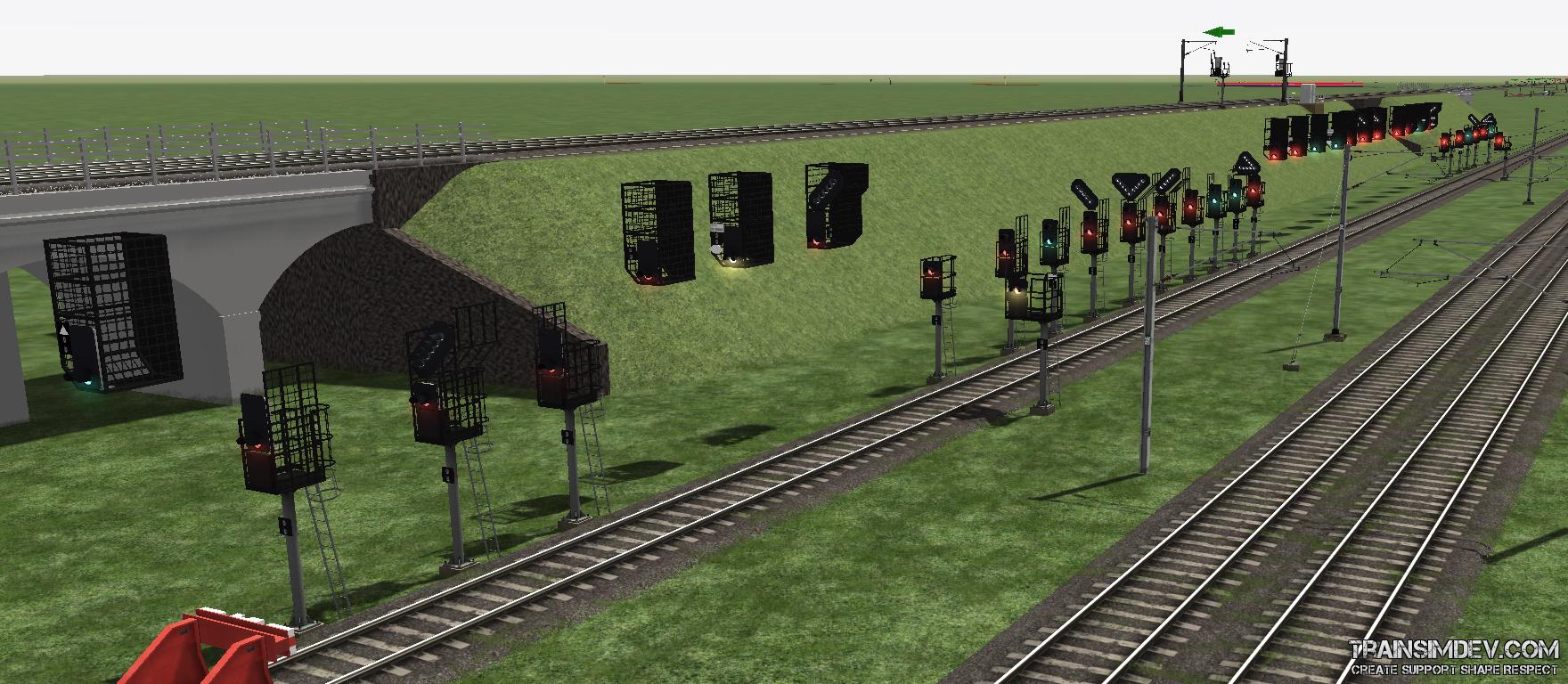
Image
Image
4305

They all need a bit of polish before uploading.

Re: Mundo's Modern Bits

PostPosted: Thu Jun 02, 2016 3:34 pm
by johny
I see no route or stencil indicators, did you run into the same problems as I did? Using UKPro scripts, model indicators show in game but the characters fail to show, only the placement. I've got so disenchanted I've packed in the Steam/DTG simulator altogether.

John

Re: Mundo's Modern Bits

PostPosted: Thu Jun 02, 2016 3:50 pm
by AndiS
If someone has an early version of these Pro signals that came with .lua files instead of .out file, I could take a look at this problem. It cannot be rocket science, but with .out files only, my chances are nil.

Re: Mundo's Modern Bits

PostPosted: Thu Jun 02, 2016 3:58 pm
by JamesLit
I've got them, I'll upload for you.... :)

EDIT: tada! https://dl.dropboxusercontent.com/u/37636253/TSD/Pro%20Signals.zip

Re: Mundo's Modern Bits

PostPosted: Thu Jun 02, 2016 8:56 pm
by Mundo
Hi John

I did get an alpha-numeric indicator working, in my case it just displayed U or D, but it did use the R/H signal configuration flyout.

How can I help?

Re: Mundo's Modern Bits

PostPosted: Fri Jun 03, 2016 8:17 am
by johny
I put it down to an inability on the part of 3DCrafter when creating the .igs file, although I notice elsewhere folks have had a similar problem with 3DS, but there it was solved. I am in my mid-eighties now and did not fancy learning a new modelling program (3DS), and the price put me off in any case.

John

Re: Mundo's Modern Bits

PostPosted: Fri Jun 03, 2016 3:24 pm
by Mundo
Hi John

This only applies to alphanumeric indicators I havent tried stencils yet.

The crucial part in the .igs file is the naming of parts and textures
At its simplest the model can be a box and a polyon (more polys for other digits).

The box can be named anything and the same applies to the applied shader name and texture file. ie 1_xxxx_MundoBox, TrainBasicDiffuffuse.fx called MundoTex and MundoTex.ace.

The poly for the first display digit has to be called 1_xxxx_primarydigits_1.
The Tex shader for the digit can be called anything, but makes it sense to relate to the object. The original RS signal files/documents used 'P_Letter_0'.
The texture file used is primarynumber_0.ace.

The same applies to creating signal ID plates or mileposts.

Re: Mundo's Modern Bits

PostPosted: Fri Jun 03, 2016 10:22 pm
by Mundo
The signals from JT seem to have most if not all aspects covered regarding LED signals.
Hopefully some of my bits and bobs might add something.

Starting off with the easier bits.

A full set of modern permanent AWS magnets both clean and dirty.
4310
A NR document from 2010 provided the classifications in white, the black ones are an assumption.
The green versions are a higher strength magnet used on 3rd or 4th rail track. Same function, different texture.
1 applies to the magnet used if travelling from bottom to top and will be the main AWS ramp track link
2 applies to the magnet used if travelling from top to bottom. I'll create an invisible/editor only object for this one, unless a bi directional AWS function is possible?

I've only found a couple of pictures of temporary magnets via Google, it's enough to create a model, but more are always welcome.

Re: Mundo's Modern Bits

PostPosted: Fri Jun 03, 2016 11:36 pm
by JamesLit
I work on a station and we have at least one AWS magnet in a platform in plain view, good natural lighting, and very, very grubby. Might be useful to see it for the weathering? I'll happily take some pictures on Monday. :)

Re: Mundo's Modern Bits

PostPosted: Sun Jun 05, 2016 5:42 pm
by Mundo
Hi James thanks for the offer, any pictures of infrastructure you can reach/see would be great.
They keep kicking me off the platforms on the NLL when I start taking pics of S&T or PW kit :(

I might do this one as it seems like it could replace all of the above versions due to newer magnets and electronics.
Image
Same company makes this portable one.
Image

I had a little go this afternoon on the clamplock(Mk2). The green parts move with the switch, the darker green components have been raised for visibility (modelers license ;) ).
I think the best way to implement them would be as a signal asset, similar to a disc indicator using the track links to set the L/R direction but without sending any occupation data.
4311